Chapter 13Microbiology
Menu: Microbiology. Address: /lab/microbiology.
13.1 What this screen is for
This is where a culture is followed from the day it is started to the day it is closed. The list shows every culture of the laboratory with its state; beside it, the open culture shows its growth, the antibiotics chosen when it was ordered, and its susceptibility results.
Three jobs are done here: starting a culture that was ordered and is still waiting, adding susceptibility results (each one Susceptible, Intermediate or Resistant), and finalizing the culture with its state and a growth summary. A sensitivity assistant reads a device's report and proposes the results for you to review.
13.2 Who sees it
Whoever holds Enter results. The menu hides the screen from everyone else.
| You can… | …if your role holds |
|---|---|
| See the cultures, start one, add susceptibility results, finalize, use the assistant | Enter results |
13.3 The screen at a glance
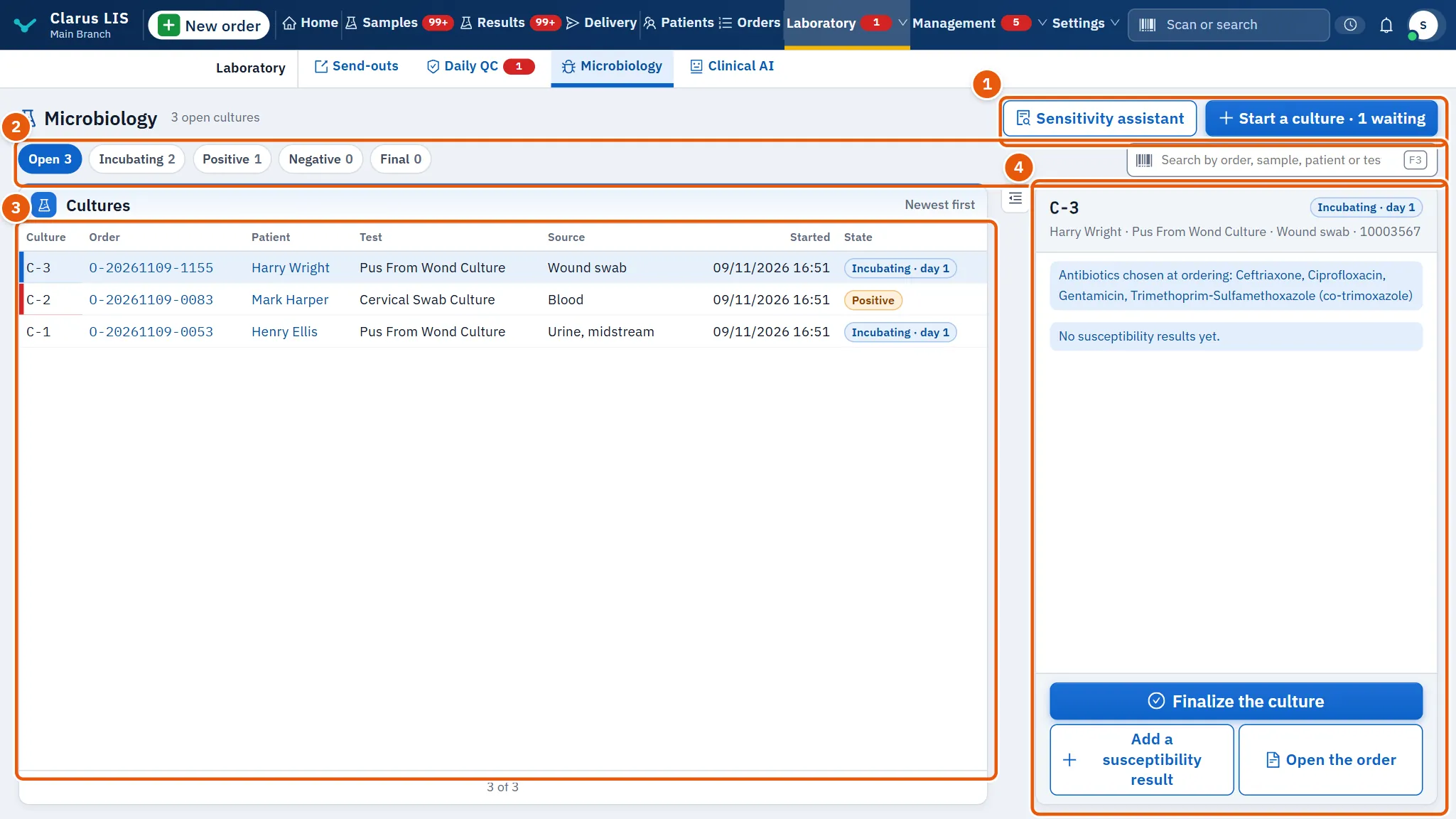
- The action buttons: Sensitivity assistant and the start button.
- The filters and search: the five culture states and the search box.
- The list: Cultures, newest first.
- The details: the chosen culture, its growth and its susceptibility table.
13.4 The head, the filters and the list
| Item | What it does |
|---|---|
| Start button | Reads «Start a culture · N waiting», where N is the number of cultures ordered and not yet started. It opens the start window. |
| Sensitivity assistant | Opens the assistant for the culture now chosen. It appears whenever a culture is chosen; the first row of the list is chosen for you until you press another. |
| Culture state | Five tags, each with its count: Open (incubating and positive together, the default), Incubating, Positive, Negative, Final. Changing the tag clears the chosen culture. |
| Search box | Searches by order, sample, patient or test. |
| Cultures | One row per culture; a positive culture is marked as urgent. The rows load fifty at a time, with a button for more. |
The columns of the list:
| Column | Meaning |
|---|---|
| Culture | The culture's number, written C-n. |
| Order | The order; it is a link to the order. |
| Patient | The patient. |
| Test | The culture test. |
| Source | Where the specimen came from. |
| Started | When incubation began. |
| State | Incubating (with the day of incubation, for example «day 2»), Positive, Negative or Final. |
When the list is empty it says so for the tag chosen (for example «No cultures incubating.»), or «No culture matches» followed by your search words. The list refreshes itself every minute.
13.5 The culture's details
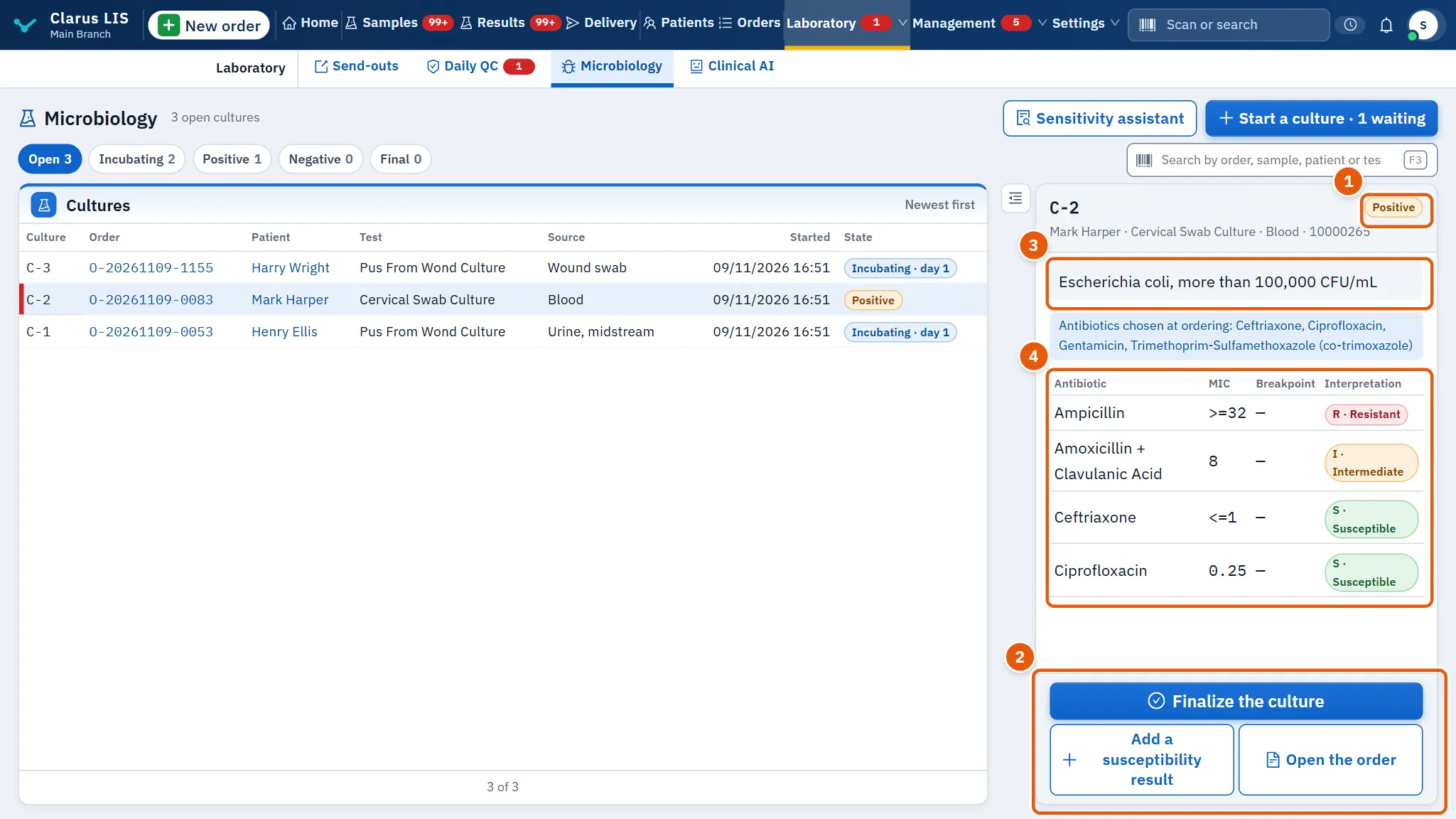
The heading shows the culture's number and state, then the patient, test, specimen source and sample. Under it:
| Item | What it does |
|---|---|
| Finalize the culture | Opens the finalizing window. It appears only while the culture is open (incubating or positive). |
| Add a susceptibility result | Opens the susceptibility window. It is hidden for a negative culture. |
| Open the order | Goes to the order's edit page. |
| Growth | The growth summary if one was written; otherwise Growth: followed by the organisms found. |
| Antibiotics chosen at ordering: … | A note naming the antibiotics chosen when the culture was ordered. |
| Susceptibility table | Antibiotic, MIC, Breakpoint and Interpretation (S, I or R with its name). When the culture has more than one organism, each row names its organism. |
With no results yet, the table is replaced by «No susceptibility results yet.»
13.6 Tasks, step by step
13.6.1 Task 1 — Start a culture
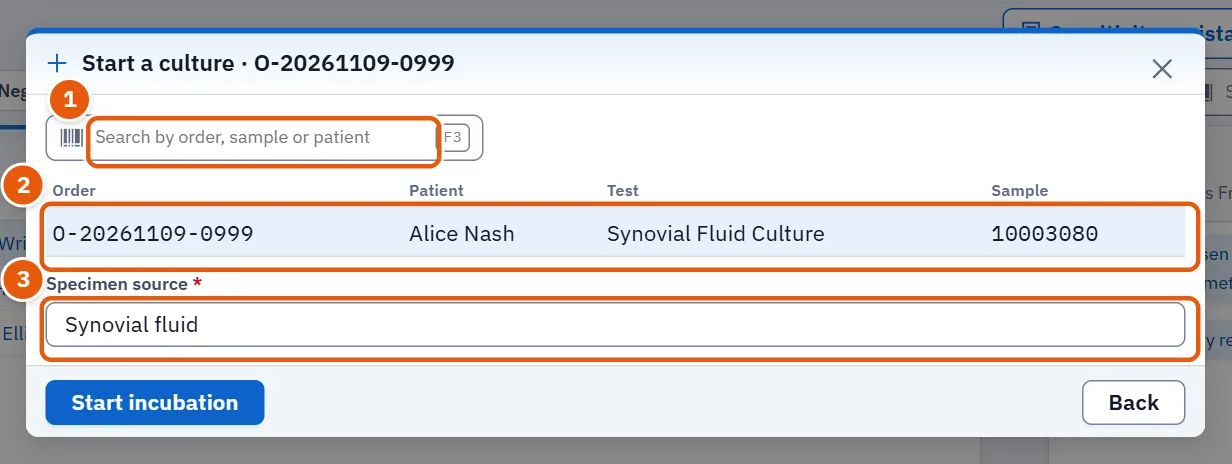
- Press the start button.
- Optionally search by order, sample or patient.
- Choose the row of the culture. The window title now names its order.
- Check Specimen source. It appears once a row is chosen and is filled with the specimen type of the order; correct it if needed. It cannot be empty.
- Press Start incubation. It stays dim until a row is chosen and the source is filled.
The culture joins the list as incubating. If nothing is waiting, the window says «No cultures waiting to start.»
13.6.2 Task 2 — Add susceptibility results
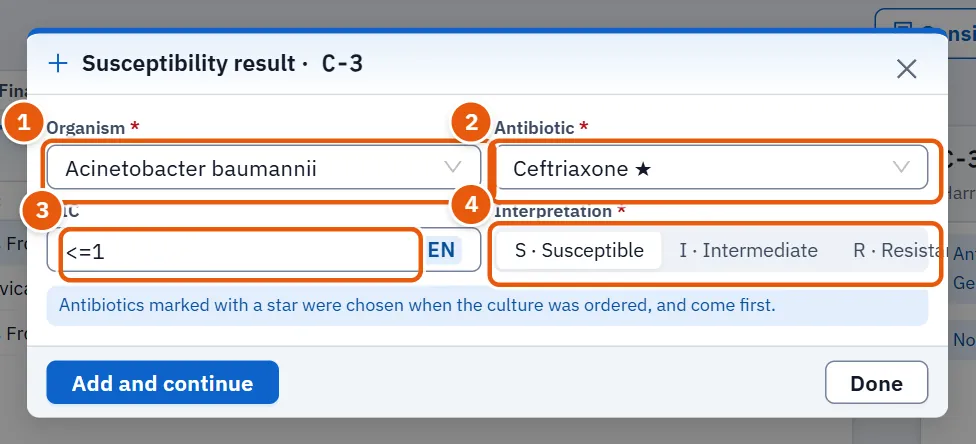
- Choose the culture, then press Add a susceptibility result.
- Choose the Organism. Both lists can be searched by typing.
- Choose the Antibiotic. Antibiotics marked with a star were chosen when the culture was ordered and come first.
- Type the MIC if you have it. It is optional.
- Choose Interpretation: S Susceptible (Susceptible), I Intermediate (Intermediate) or R Resistant (Resistant). Nothing is chosen at first.
- Press Add and continue. The organism stays; the antibiotic, MIC and reading are cleared for the next one. The window counts the results added.
- When finished, press Done.
The add button stays dim until the organism, the antibiotic and the reading are chosen.
13.6.3 Task 3 — Use the sensitivity assistant
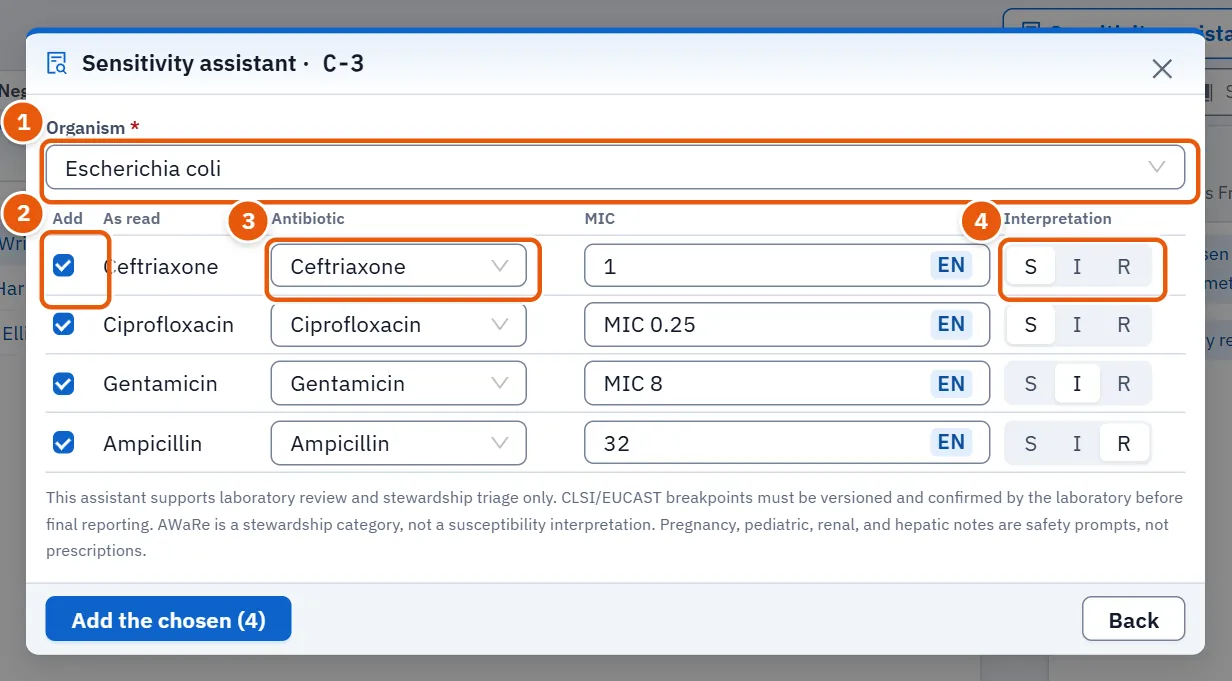
- Choose the culture, then press Sensitivity assistant.
- Either choose the device's file (PDF, text, CSV or an image) with Choose the device's file, or paste its text in Or its text. Once a file is chosen the text box is disabled.
- Press Extract the results.
- Review what came back. The organism is matched from your list; change it if wrong. Each row shows As read, the antibiotic matched, the MIC and the reading. A row that could not be matched says «Not matched: choose the antibiotic»; choose one, or leave it unticked. A row's tick box is dim until it has both an antibiotic and a reading. Notes above the table are the assistant's own warnings; read them.
- Correct any row, and tick the ones to keep (a row with a match and a reading is ticked by itself).
- Press the button «Add the chosen (N)».
Nothing is added without this review. The read button stays dim until a file is chosen or text is typed, and the add button until an organism is chosen and at least one row is ticked. If the file gives no results the window says so. After adding, the rows are locked and the window closes with Done.
13.6.4 Task 4 — Finalize a culture
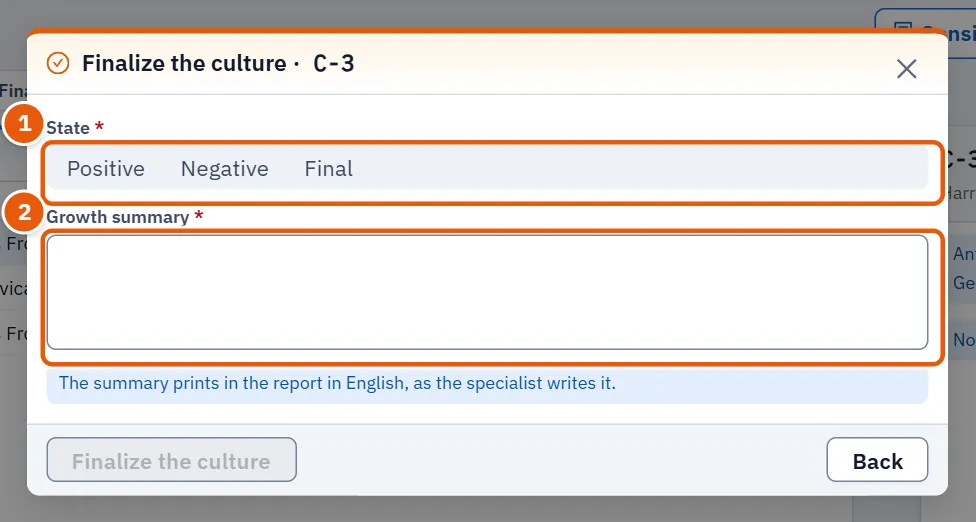
- Choose an open culture and press Finalize the culture.
- Choose the State: Positive, Negative or Final. None is chosen at first.
- Write the Growth summary. It starts with the growth summary already written, if any. It is required and prints in the report in English, as the specialist writes it.
- Press Finalize the culture. It stays dim until the state is chosen and the summary is not empty.
13.7 Messages and what to do
| The screen says | Meaning | What to do |
|---|---|---|
| The cultures could not be loaded. | The list did not arrive. | Use the retry offered under the list. |
| No cultures waiting to start. | Every ordered culture has been started. | Nothing to do. |
| The action failed. Try again. | The server refused or did not answer; when the server gives its own reason, that is shown instead. | Press the button again; if it persists, tell the administrator. |
| Susceptibility is shown from the laboratory's newest results only, until the server returns the whole culture. | The culture's full record has not arrived yet. | Wait a moment; the full table replaces it. |
| The assistant read no susceptibility results from this file. | The file had nothing the assistant could read. | Try the text, or add the results by hand (13.6.2 Task 2 — Add susceptibility results). |
| No cultures here. | The list is empty, so there is nothing to show in the details. | Change the tag or the search. |
| Choose a culture to see its growth and susceptibility. | Rows exist but none is chosen (the screen normally chooses the first one). | Press a row. |
13.8 See also
- Results for entering and approving the order's results.
- Orders for the order itself.