Your laboratory and its branches, on your phone
Follow your laboratory, receive its alerts and decide from anywhere: Clarus LIS Manager is an Android app for the laboratory's manager and whoever the manager allows. It is free, and it works with the trial too.
Browsing on a computer? Scan this code with your phone's camera to open the page there and download the app.
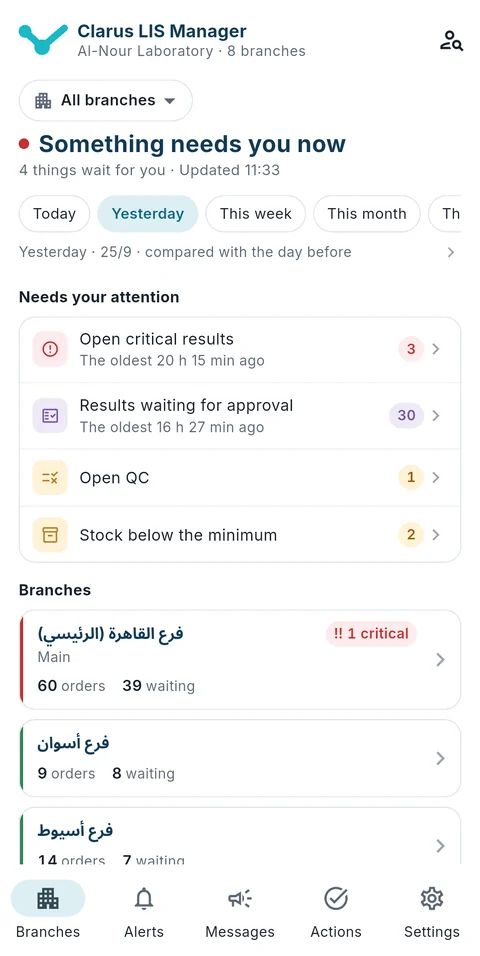
Branches 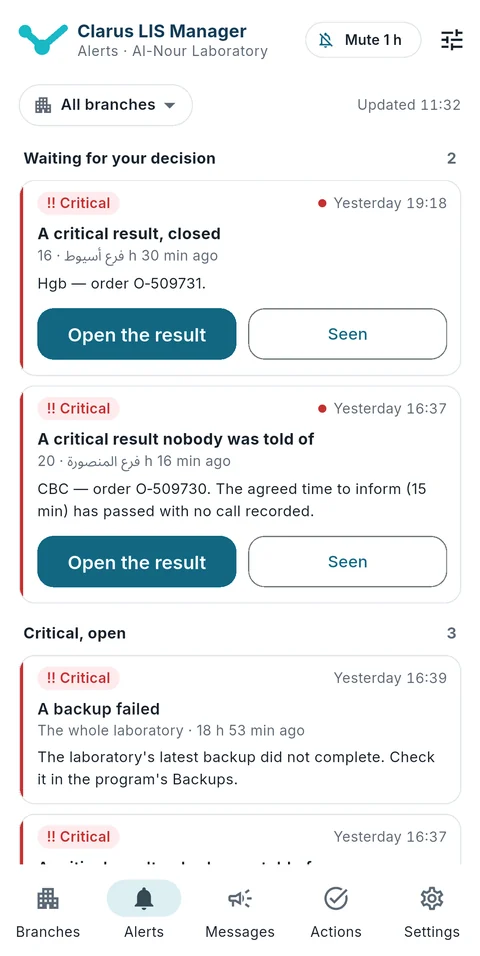
Alerts 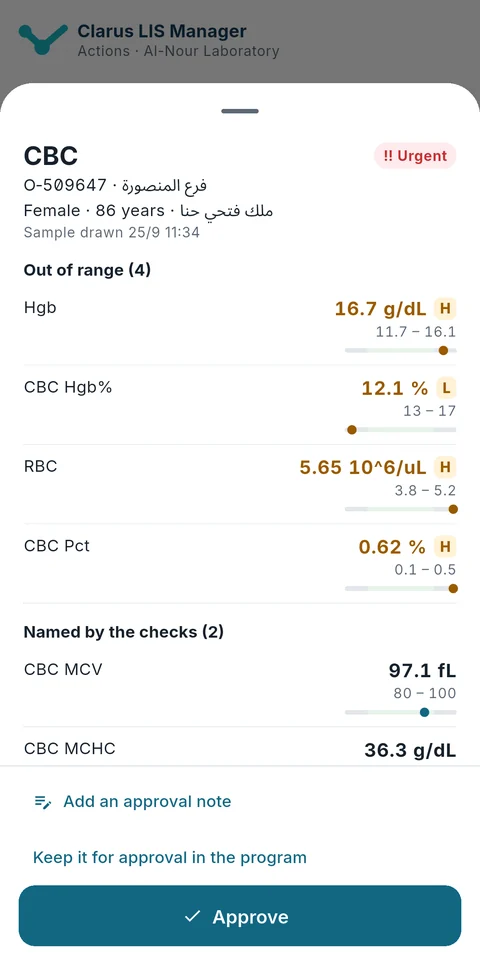
Approving results
Screens from a trial laboratory with invented data.
What Clarus LIS Manager does
Branches
Each branch's figures today: orders, results released, those released on time and the median turnaround, with money for those the laboratory allows; choose one branch and the whole app shows it.
Alerts
From the program itself, over the app's own connection, with no Google services: a critical result the doctor has not been told of and its escalation, a rejected sample, a backup that did not complete, and more. A small icon stays in the notification bar while the app is watching.
Actions, with your permissions
Approve results with an approval note; approve a discount or a refund, or decline it with a reason the requester reads; end a user's sessions or suspend the account with a written reason; switch off access from outside the laboratory.
Messages
Send messages to the program's screens and read the replies.
Patients
For those the laboratory allows: search, the patient's file and orders; a protected file opens only with a written reason, kept in your name.
Security
The phone pairs with a code shown only inside the laboratory, valid for ten minutes and once; it checks the laboratory server's certificate on every connection; the app opens with your fingerprint or your phone's lock and locks again after five minutes away; its notifications carry no patient's name.
Your phone reaches your laboratory from inside it and from outside
On the laboratory's network, or from outside through the access method the laboratory switched on: a fixed address, a VPN on the laboratory's router, or Tailscale, with no fee from us. Or it reaches the laboratory from anywhere through Clarus Link, a paid service that passes through the Clarus intermediary server, with which the laboratory opens no door to the internet, and which it chooses from inside. If your laboratory chose to be reached through Clarus Link, your phone's connection passes through it encrypted from the phone to the laboratory itself: the server reads none of it and holds no key, and keeps only the laboratory's id, the time of the connection and the bytes transferred, for thirty days, then deletes them. We never keep your laboratory's data in a readable form on our servers.
Download Clarus LIS Manager
The app is for Android only, and it is downloaded straight from our server, not from an app store.
- Version
- 1.0.0
- Size
- 35.5 MB
- Runs on
- Android 7.0 or later
- Released
- 2026-09-25
What is new
The first release of Clarus LIS Manager: your laboratory's branches and figures, its alerts even with the app closed, result approvals, money decisions, users, messages and patients — from your phone, with your permissions in the program. It reaches the laboratory directly, or through the Clarus intermediary server when it is enabled for your laboratory.
Installing it in four steps
The app is downloaded from our site directly, not from a store, so your phone may ask for permission once: allow the browser to install apps when it asks, then tap “Install”.
- Open this page on an Android phone and tap "Download the app".
- Open the file once it has downloaded. If Android asks you to allow the browser to install apps, allow it.
- Tap "Install".
- Open the app and scan the pairing code the program shows inside the laboratory.
If your phone stops the installation
- Samsung: On recent Samsung phones, “Auto Blocker” stops apps from outside the stores from installing. To finish the installation: open Settings → Security and privacy → Auto Blocker, turn it off, install the app, then turn it back on if you wish.
- Xiaomi, Redmi and POCO: A Xiaomi phone may run a security scan of the file before installing it; check that it comes from claruslis.com, then continue.
- Huawei and Honor: A Huawei phone scans every app from outside AppGallery and may ask for your phone’s lock code before installing. If “Enhanced protection” or “Pure mode” is on, turn it off in Settings before installing.
- Oppo and Realme: Your phone shows an app verification page before installing; follow its steps until the “Install” button appears.
To be sure the file is ours, compare its fingerprint and its signing certificate's fingerprint with the ones here before installing.
File fingerprint (SHA-256)9066761ef77853348bf875245d6f0b75137cd085345756c35ec11ecea7b671af
Signing certificate fingerprint (SHA-256)
35:11:16:53:73:66:CF:15:3B:CC:A9:8C:EA:BE:1B:5C:A4:1E:BA:58:86:47:F7:5D:B0:F6:4F:2D:1D:9E:A6:CA
Questions about the app
Is the app free?
Yes, completely free, and it works with the trial too.
Is there an iPhone version?
No. Clarus LIS Manager is for Android only.
Why is it not on Google Play?
Because we distribute it straight from our server, so when you install it Android asks you to allow installing an app from this source.
Does it need Google services?
No. Its alerts arrive over the app's own connection to the program, with no Google services.
How does it get updated?
It updates itself from our server with a signed release.
Do you keep my laboratory's data on your servers?
No, never. The phone talks to your laboratory's own server. If your laboratory chose to be reached through Clarus Link, your phone's connection passes through it encrypted from the phone to the laboratory itself: the server reads none of it and holds no key, and keeps only the laboratory's id, the time of the connection and the bytes transferred, for thirty days, then deletes them.
What do I need to use it from outside the laboratory?
That the laboratory has switched on access from outside: a fixed address, a VPN on the router, or Tailscale, with no fee from us; or Clarus Link, a paid service the laboratory chooses from inside, without opening a door to the internet.